Skip to content

Web + MobileSchool management platformSchool management

One school. One platform. Everything connected.

Shkolla360 brings school administration, teachers, students and parents together in one intuitive platform. Manage schedules, the class register, assignments, tests, grades, attendance and school communication — all in one place.

  • Administration
  • Directors
  • Teachers
  • Students
  • Parents
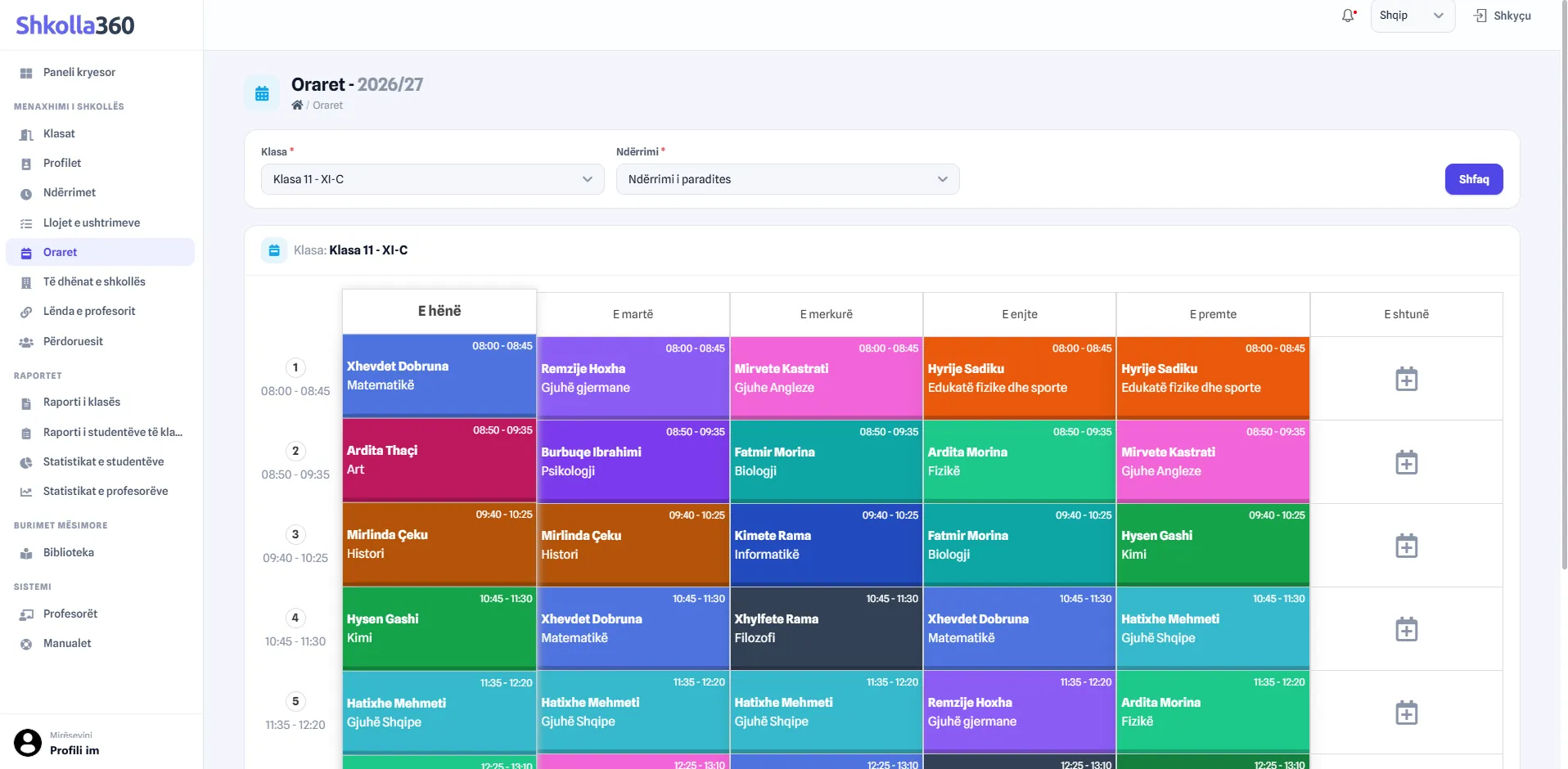
Shkolla360 web timetable for class XI-C, morning shift: each lesson of the week with its teacher and subject, colour-coded by subject.
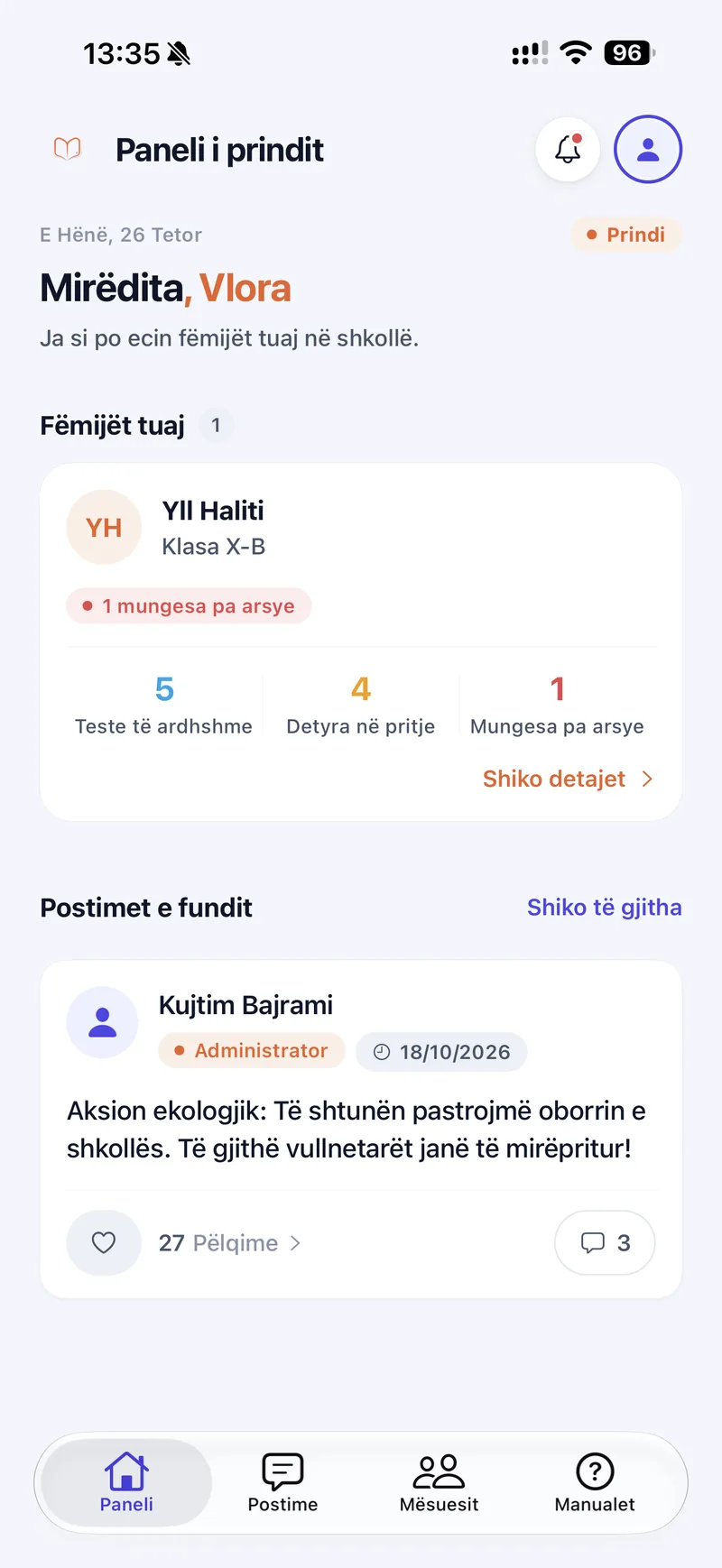
Shkolla360 parent dashboard showing a child's upcoming tests, pending assignments and unexcused absences, plus the latest school post.
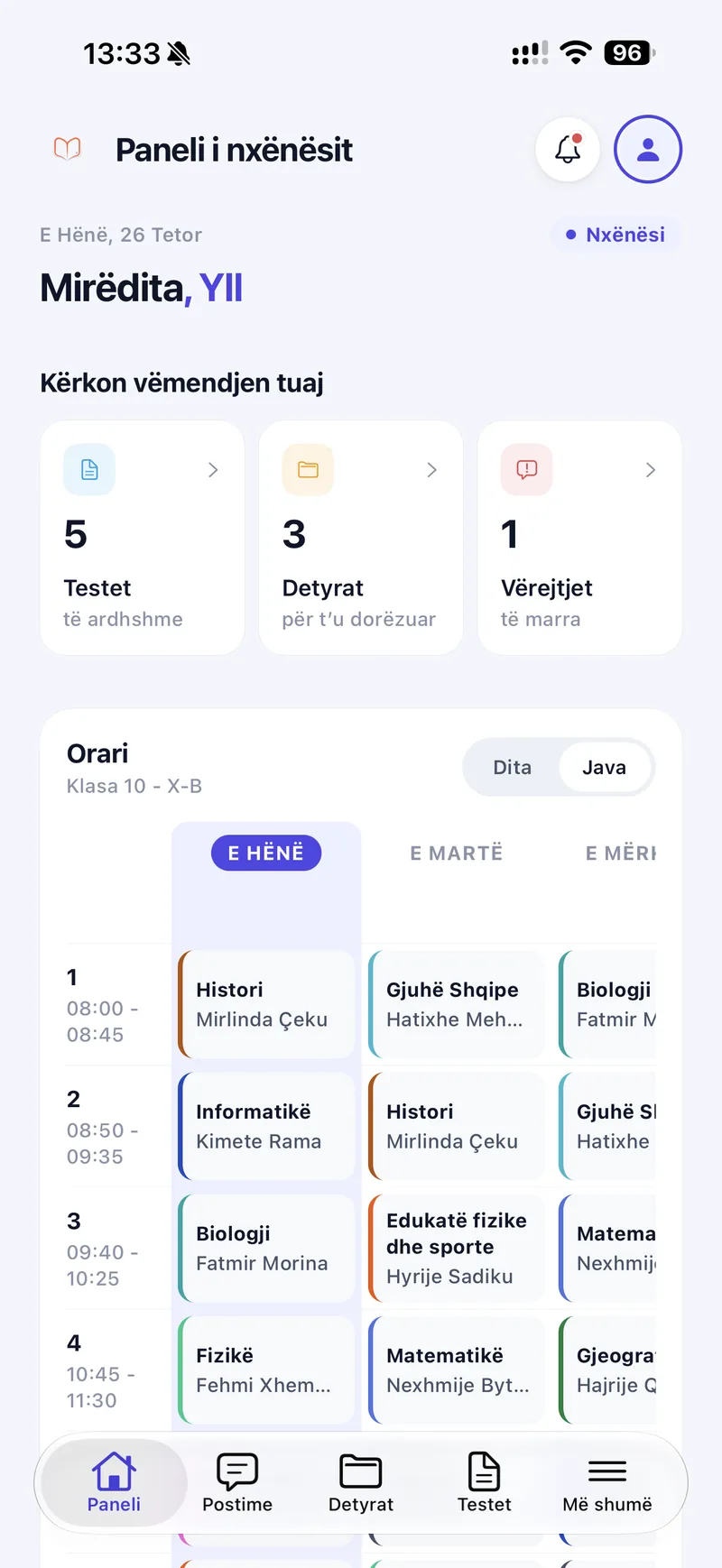
Shkolla360 student dashboard on mobile showing 5 upcoming tests, 3 assignments to hand in, 1 remark and the weekly class timetable.

The platform

Everything your school needs. In one place.

Replace disconnected workflows with a unified school management experience that makes daily school operations simpler, clearer and more efficient.

  • Centralized school management

    Manage school years, periods, levels, subjects, classes, teachers and timetables from one organized platform.

  • Digital teaching tools

    Give teachers an electronic class register, tests, assignments and online lessons in one workspace.

  • Connected students & parents

    Keep students informed and give parents a clear view of attendance, grades and remarks for each child.

  • Better visibility & reporting

    Give school leadership class, student and teacher reports to support everyday decisions.

Who it's for

Designed for everyone in the school community.

From school administration to the classroom and home, Shkolla360 gives every user the tools and information they need.

Teachers

More time for teaching. Less time on administration.

Teachers see their day at a glance, keep the class register up to date and manage tests and assignments from the web or their phone.

  • Electronic class register
  • Weekly teaching schedule
  • Attendance and remarks
  • Period and final grades
  • Tests and assignments
  • Online lessons
  • Class management
  • Library resources
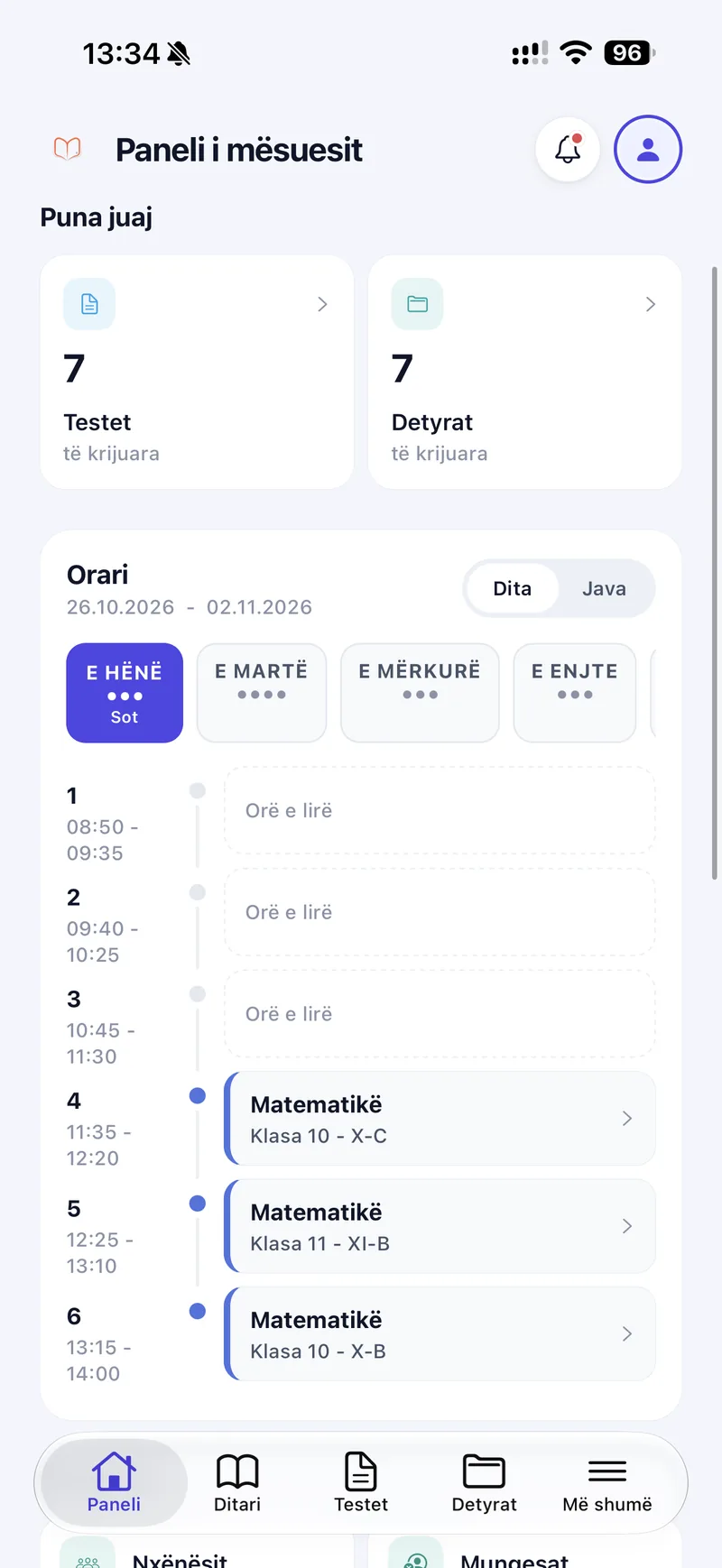
Shkolla360 teacher dashboard on mobile showing created tests and assignments and today's lessons with free periods.
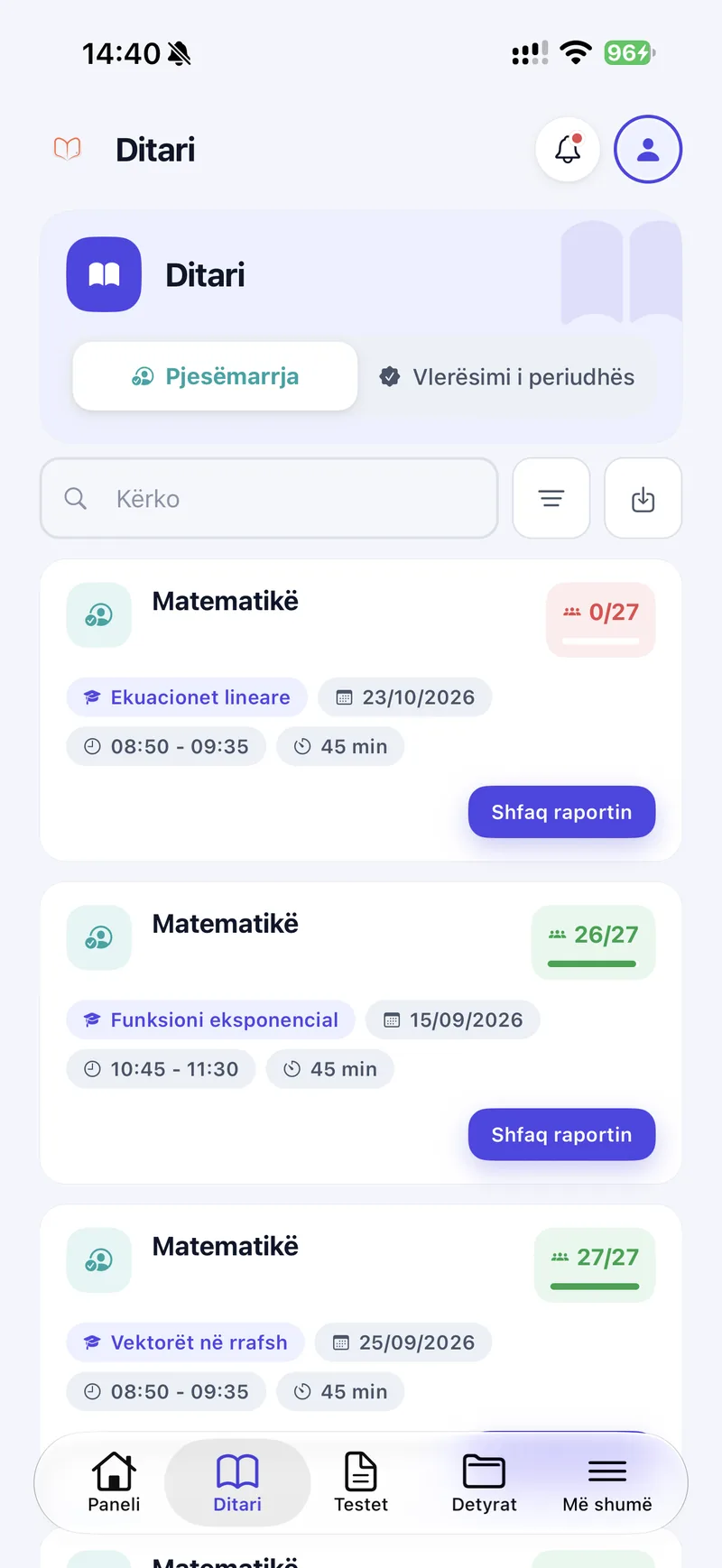
Shkolla360 class register on mobile listing Mathematics lessons with topic, date, time and attendance such as 26 of 27 students.

Features

Powerful tools for everyday school life.

Every module is built around a real school workflow — from planning the week to grading a test and keeping families informed.

Smart school scheduling

The whole school week, clearly organized.

Directors build each class's weekly timetable by shift, with the teacher and subject for every lesson. Teachers and students see the same schedule on the web and in a daily or weekly view on mobile.

  • Class timetables by shift
  • Teacher schedules
  • Subjects and lesson times
  • Daily and weekly views
Shkolla360 web timetable for class XI-C, morning shift: each lesson of the week with its teacher and subject, colour-coded by subject.

Electronic class register

Attendance for every lesson, without paper.

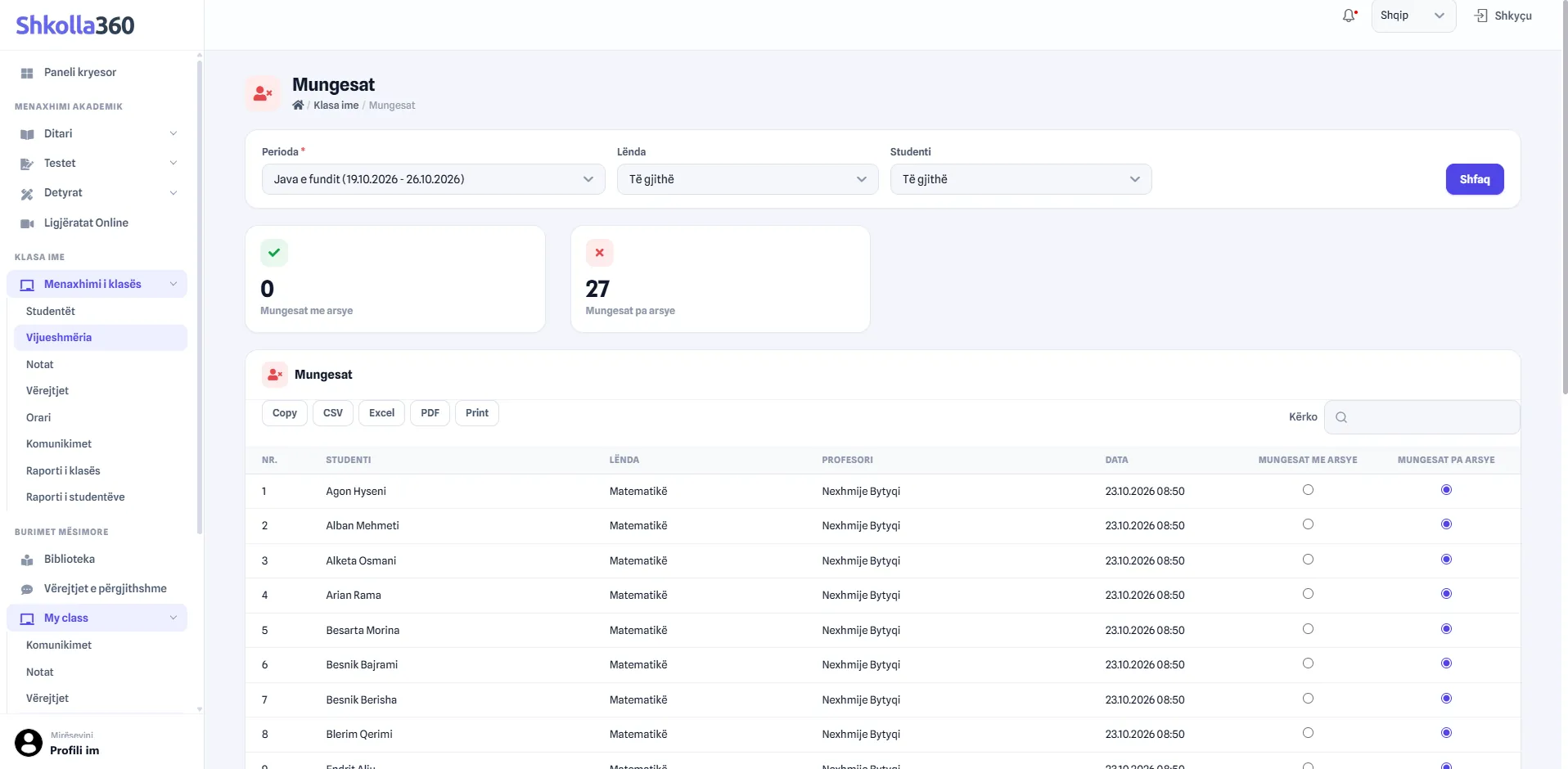
Teachers record attendance lesson by lesson from the web or their phone. Excused and unexcused absences are totalled for each period, next to remarks and grades in the same register.

  • Attendance per lesson
  • Excused and unexcused absences
  • Teacher remarks
  • Exports to Excel, CSV and PDF
Shkolla360 web attendance view for the last week: 0 excused and 27 unexcused absences, listed by student, subject, teacher and date.
Shkolla360 class register on mobile listing Mathematics lessons with topic, date, time and attendance such as 26 of 27 students.

Grades & student progress

Grades that students and parents can follow.

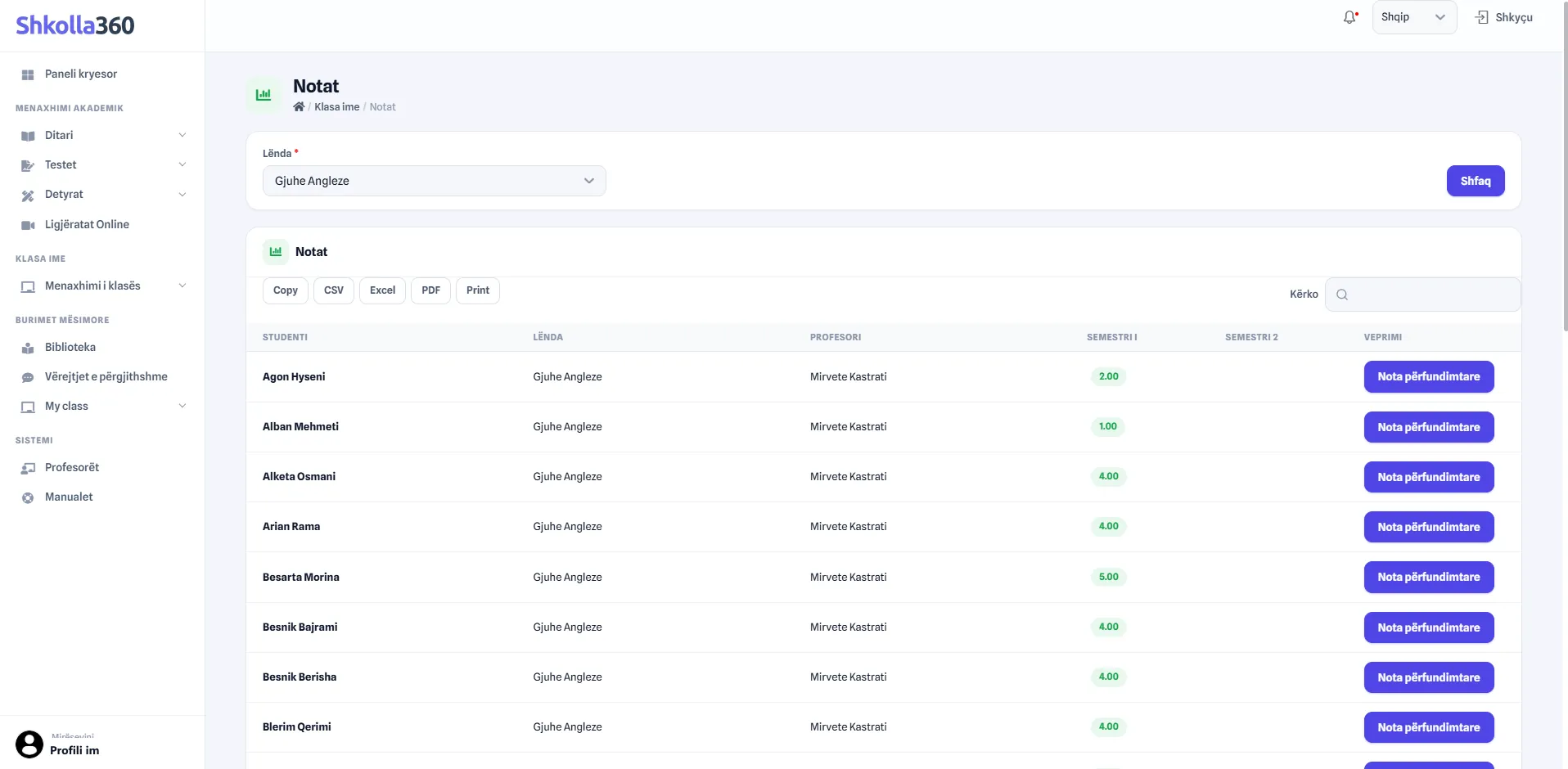
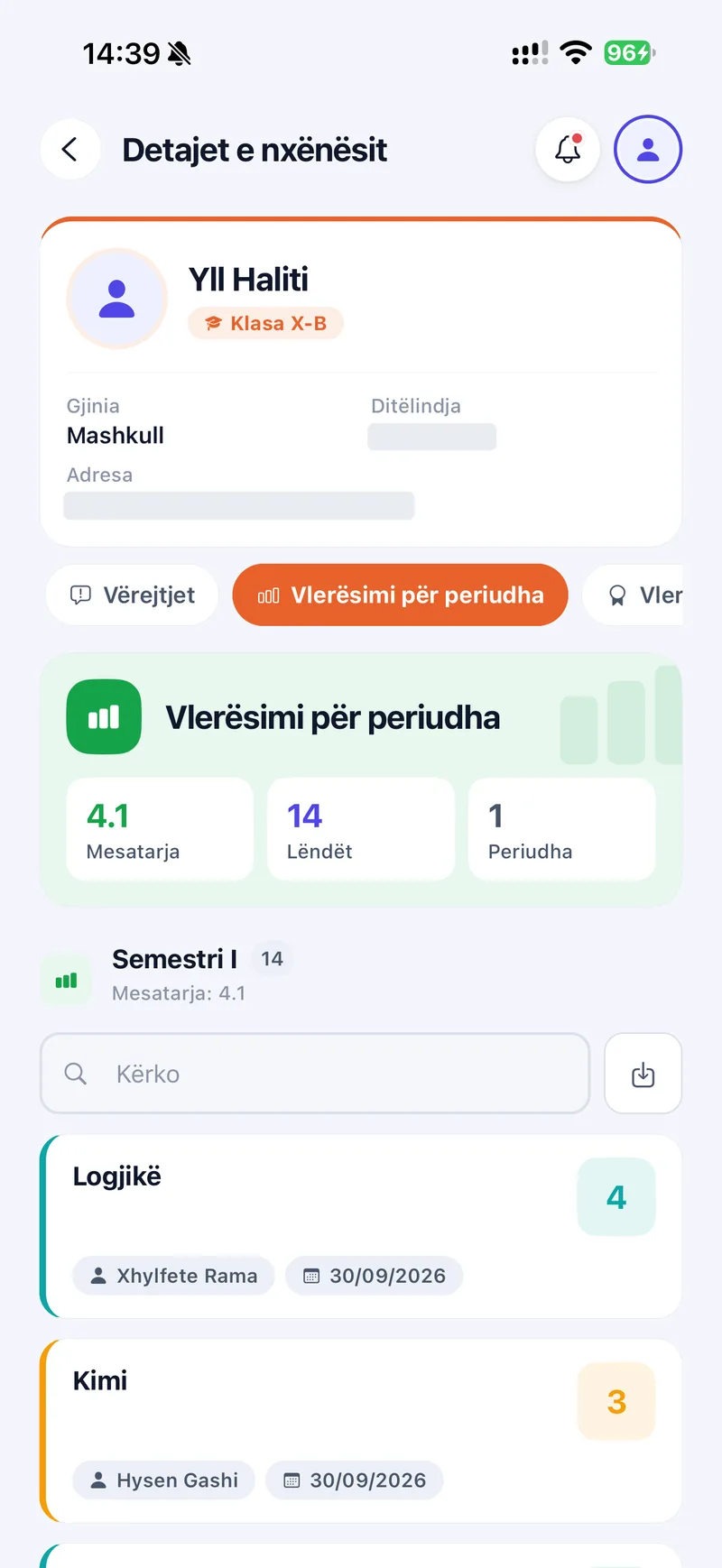
Teachers see their students' semester grades and set final grades. Students and parents follow every subject's grade, the teacher who gave it and the period average.

  • Grades per semester
  • Final grades
  • Period averages
  • Visible to students and parents
Shkolla360 web grades list for English: each student with their semester grade and a button to set the final grade.
Shkolla360 student details on mobile showing period grades: an average of 4.1 across 14 subjects, with each subject's grade and teacher.

Tests & assessments

Evaluations and results in one flow.

Teachers create a test for a class with its date, time window and points, and can notify students in advance. Students follow ongoing and past tests and see their results.

  • Date, time window and points
  • Student notifications
  • Graded and pending status
  • Results for students
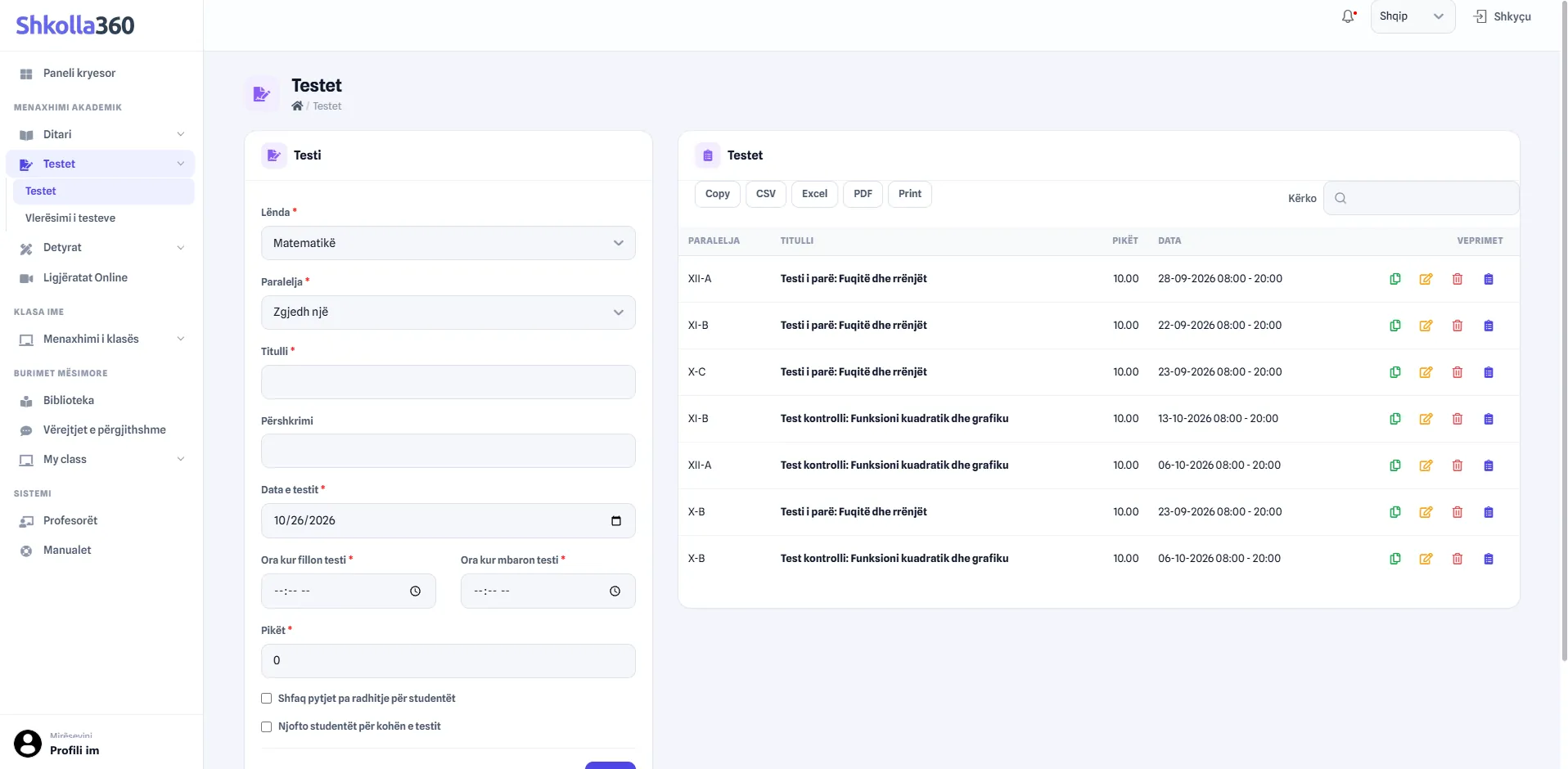
Shkolla360 web test form with subject, class, title, description, date, start and end time and points, next to the list of created tests.
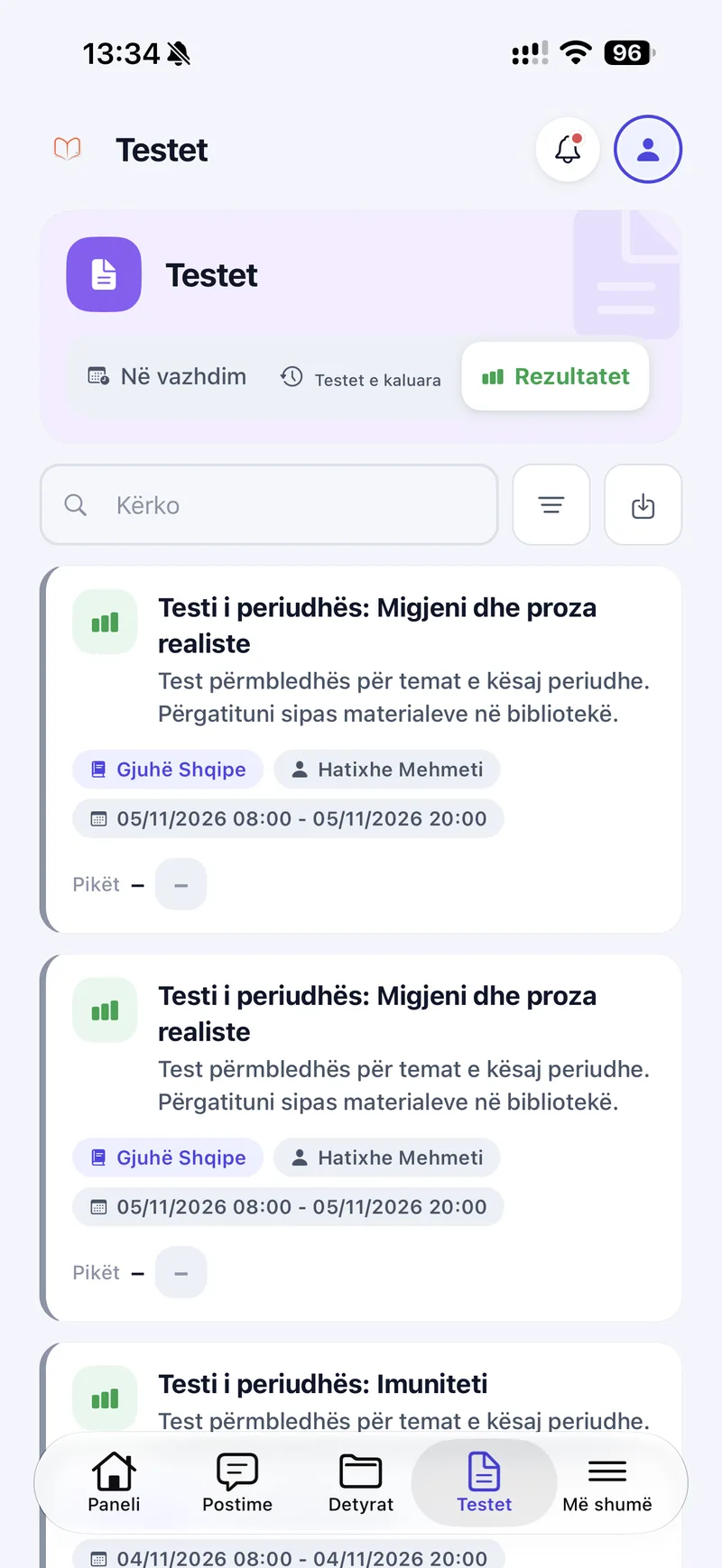
Shkolla360 student tests screen with ongoing, past and result tabs and test cards showing subject, teacher and time window.

Assignments & homework

Set coursework in a minute. Keep every class informed.

Teachers choose the subject, assignment type and classes, set the time window, add instructions and attach a file. Students see what is due on their dashboard.

  • Subject, type and class selection
  • Start and due dates
  • Instructions and file attachments
  • Evaluation of submitted work
  • Learning resources

    A digital library and online lectures keep learning materials in one accessible place.

    • Digital library
    • Online lectures
    • Class materials
  • School communication

    Posts, school news and notifications keep students and parents up to date.

    • School posts
    • Class communications
    • Notifications
  • Reports & academic overview

    Leadership gets organised reports on classes, students and teachers.

    • Class reports
    • Student statistics
    • Teacher reports

Web & mobile

Your school, connected wherever you are.

Manage school operations from the web and stay close to the learning experience through the Shkolla360 mobile app.

Web application

A complete workspace for running the school.

  • School and academic configuration
  • Timetables, shifts and teacher schedules
  • Electronic class register
  • Tests and assignments
  • Reports, statistics and administration
Shkolla360 web test form with subject, class, title, description, date, start and end time and points, next to the list of created tests.
  • Shkolla360 teacher dashboard on mobile showing created tests and assignments and today's lessons with free periods.
    TeacherMobile app
  • Shkolla360 student dashboard on mobile showing 5 upcoming tests, 3 assignments to hand in, 1 remark and the weekly class timetable.
    StudentMobile app
  • Shkolla360 parent dashboard showing a child's upcoming tests, pending assignments and unexcused absences, plus the latest school post.
    ParentMobile app

Mobile application

Role-specific and simple to use on the go.

  • Clear, role-specific dashboards
  • Daily and weekly schedules
  • Tests and assignments on the go
  • Notifications and school posts
  • Attendance and grades for parents

How it works

Simple to use. Built for real school workflows.

Shkolla360 follows the way a school already runs: structure first, then teaching, then everyone who needs to stay informed.

  1. 1

    Step 1: Organize your school

    Set up school years, periods, levels, subjects, classes and users.

  2. 2

    Step 2: Empower teachers

    Teachers get their schedules, class register, tests and assignments.

  3. 3

    Step 3: Connect students & parents

    Students and parents follow timetables, assignments, grades, attendance and posts.

  4. 4

    Step 4: Stay informed

    Leadership follows school activity through reports and statistics.

Product tour

See how a connected school works.

A tour of the real Shkolla360 web and mobile apps, as directors, teachers, students and parents use them every day.

Benefits

Better school management. A better experience for everyone.

  • For school leaders

    Keep academic organisation, staff, schedules and reports within one centralized workspace.

  • For teachers

    Spend less time organizing classroom records and more time focusing on teaching.

  • For students

    Stay informed about lessons, assignments, tests and academic progress.

  • For parents

    Stay involved in your child's education through accessible academic information.

Trust & responsibility

Built for the school community.

Shkolla360 holds a school's academic records, so it is organised around who needs what. Every person works in a workspace that matches their role.

  • Role-based workspaces

    Administrators, directors, teachers, students and parents each sign in to a workspace built for their responsibilities.

  • Organized academic records

    Attendance, remarks, grades, tests and assignments are kept in one structured system instead of scattered paperwork.

  • Information for the right people

    Parents follow their own children, students see their own classes, and leadership sees the school as a whole.

  • Built-in user manuals

    Manuals inside the platform help every role find their way around from the first day.

Role-based workspacesWhat each role works with in Shkolla360
Information available in each Shkolla360 workspace
RoleWorks with
AdministrationSchools, school years, subjects, users, news
DirectorsClasses, staff, timetables, reports
TeachersTheir schedule, register, tests, assignments
StudentsTheir timetable, tests, assignments, results
ParentsEach child's attendance, grades and remarks

About Shkolla360

Technology that brings education together.

Shkolla360 was created to simplify how schools organize, teach, communicate and share information. By connecting the entire school community in one digital platform, it helps schools run everyday activities with greater clarity and efficiency.

Shkolla360 is developed by Tretek SH.P.K., a software engineering company that builds digital products and custom software for organisations across many sectors.

Role-based workspaces
5
One connected platform
Web + mobile
Schools using it today
2
Shkolla360 on tretek.io(opens in a new tab)

Ready to bring your school together?

See how Shkolla360 can simplify school management and create a more connected experience for teachers, students and parents.

Request a demo

Let's talk about your school.

Share a few details and the team behind Shkolla360 will get in touch to walk you through the platform.

  1. 1Tell us about your school and your goals.
  2. 2We arrange a time that suits your team.
  3. 3See Shkolla360 with the workflows that matter to you.
info@tretek.io+386 49 800 686

Tretek SH.P.K.
Muharrem Fejza, Mati 1, Prishtinë, Kosovo

Fields marked * are required.

Tell us about your school and what you would like to see in the demo.

Your details are sent to the Tretek team so we can respond to your request. Privacy Policy